The Best AI Video Generator in 2026: 9 Tools Ranked on Real Cost Per Usable Second
Most AI video roundups compare the wrong number. They line up monthly subscription prices, note how many credits each plan includes, and stop there. But you do not buy credits. You buy finished seconds of video you are willing to put your name on, and the gap between those two things is enormous, because a large share of what these tools generate goes straight in the bin.
That is the maths this guide runs. A plan that looks cheap at $12 a month stops looking cheap when three quarters of your generations are unusable and every reroll costs the same as the attempt before it. We also cover the question that decides whether you can use any of this commercially: what each model was trained on, and who carries the liability if a rightsholder objects.
And there is a cautionary tale sitting underneath all of it. In April 2026 OpenAI shut down Sora, the most hyped consumer AI video product ever launched, roughly six months after release. Plenty of guides still list it. Every price and limit below was read off the vendor’s own pricing page in late August 2026.
Ranked best-first for general use. Prices are each vendor’s own published figures as of 25 August 2026. Read the cost-per-usable-second section before you pick a plan.
Best overall
Google Veo
Best overall for realism
Free / from $19.99 per mo
Runner-up
Runway
Best for professional control
Free / $12 per mo
Third pick
Adobe Firefly
Best for commercial safety
Free / $9.99 per mo
01
Google Veo
Best overall for realism
Veo 3.1 is the current benchmark for photorealistic motion, and its decisive advantage is native audio: dialogue, ambience and effects are generated with the picture rather than bolted on afterwards. Access runs through Google Flow, where clips cost Flow credits and the allowance scales sharply with your plan. It is the most convincing output here, and also among the fastest ways to burn a monthly budget.
Free tier: Limited free generations via Google Flow; Veo 3.1 Lite trial on the AI Pro tier
Free / from $19.99 per mo
02
Runway
Best for professional control
Runway remains the tool working editors actually keep open, because it treats generation as one step in a pipeline rather than the whole product. Motion brush, camera controls, keyframing and video-to-video give you directable results instead of a slot machine. The free tier is a one-off 125 credits rather than a monthly allowance, so treat it as a demo, not a plan.
Free tier: 125 one-time credits, not renewed monthly
Free / $12 per mo
03
Adobe Firefly
Best for commercial safety
Firefly is the answer when legal will be asked to sign off. Adobe trains its own models on licensed Adobe Stock and public-domain material rather than scraped video, attaches Content Credentials provenance metadata to outputs, and offers IP indemnification to enterprise customers. It now also brokers third-party models like Luma Ray3 in one interface, so you trade a little peak quality for a great deal less risk.
Free tier: Free daily generations across image, video and audio that refresh each day
Free / $9.99 per mo
04
Kling AI
Best image-to-video quality
Kling consistently produces the most coherent motion from a single still image, which makes it the pragmatic choice when you have product shots or artwork and need them to move. Character consistency across shots holds up better than most rivals at the price. Its paid tiers sit behind a signup wall, so we cannot verify current rates from a public page.
Free tier: Daily free credit allowance for signed-in users
Free daily credits; paid pricing not published openly
05
Synthesia
Best for training and corporate video
Synthesia is not competing with Veo and is not trying to. It turns a script into a presenter-led video in 160-plus languages, with SCORM export for learning management systems and brand controls that matter to compliance teams. For onboarding, policy and product training it removes a studio day per video. For anything cinematic it is the wrong tool entirely.
Free tier: Free plan with 10 minutes per month, 9 avatars and up to 25 generated assets
Free / from $18 per mo
06
HeyGen
Best for avatars and localisation
HeyGen’s strength is taking one video and making it work in dozens of markets, with translation and lip-sync that holds together well enough for real campaigns. Custom digital twins are quick to train and the API is genuinely usable for programmatic personalisation. Free output is watermarked and capped at one minute, so the free tier is for evaluation only.
Free tier: 3 videos per month, 1 minute each, watermarked
Free / $29 per mo
07
Luma Dream Machine
Best for camera movement
Luma’s Ray models handle sweeping camera moves, parallax and depth better than almost anything else, which makes them a favourite for establishing shots and title sequences. Commercial use is included on every paid tier, which is a cleaner position than several rivals take. The entry plan is pricier than most and the pricing page lists no permanent free tier.
Free tier: No permanent free plan listed on the pricing page
From $25 per mo billed yearly
08
Pika
Best for social and effects
Pika is built for short, punchy, slightly absurd clips rather than realism, and its Pikaffects transformations are the reason people keep it around. Credits are cheap and the entry plan is the lowest here, which suits high-volume social output where you expect to throw most attempts away. Free downloads carry a watermark.
Free tier: Free tier with limited feature access; watermarked downloads
Free / $8 per mo billed yearly
09
Canva
Best for marketers who need everything
Canva is the least impressive generator on this list and the most useful product, because generation sits inside the place your templates, brand kit and team already live. You go from clip to captioned, resized, on-brand social asset without exporting anything. AI use is metered as Standard, Premium and Ultra uses rather than credits, and the free allowance is small.
Free tier: Free plan with up to 200 Standard or 20 Premium AI uses
Free / $15 per mo billed yearly
Best AI video generators compared at a glance9 tools
#
Tool
Best for
Free tier
Price
01
Google Veo
Best overall for realism
Free tier
Free / from $19.99 per mo
02
Runway
Best for professional control
Free tier
Free / $12 per mo
03
Adobe Firefly
Best for commercial safety
Free tier
Free / $9.99 per mo
04
Kling AI
Best image-to-video quality
Free tier
Free daily credits; paid pricing not published openly
05
Synthesia
Best for training and corporate video
Free tier
Free / from $18 per mo
06
HeyGen
Best for avatars and localisation
Free tier
Free / $29 per mo
07
Luma Dream Machine
Best for camera movement
Trial only
From $25 per mo billed yearly
08
Pika
Best for social and effects
Free tier
Free / $8 per mo billed yearly
09
Canva
Best for marketers who need everything
Free tier
Free / $15 per mo billed yearly
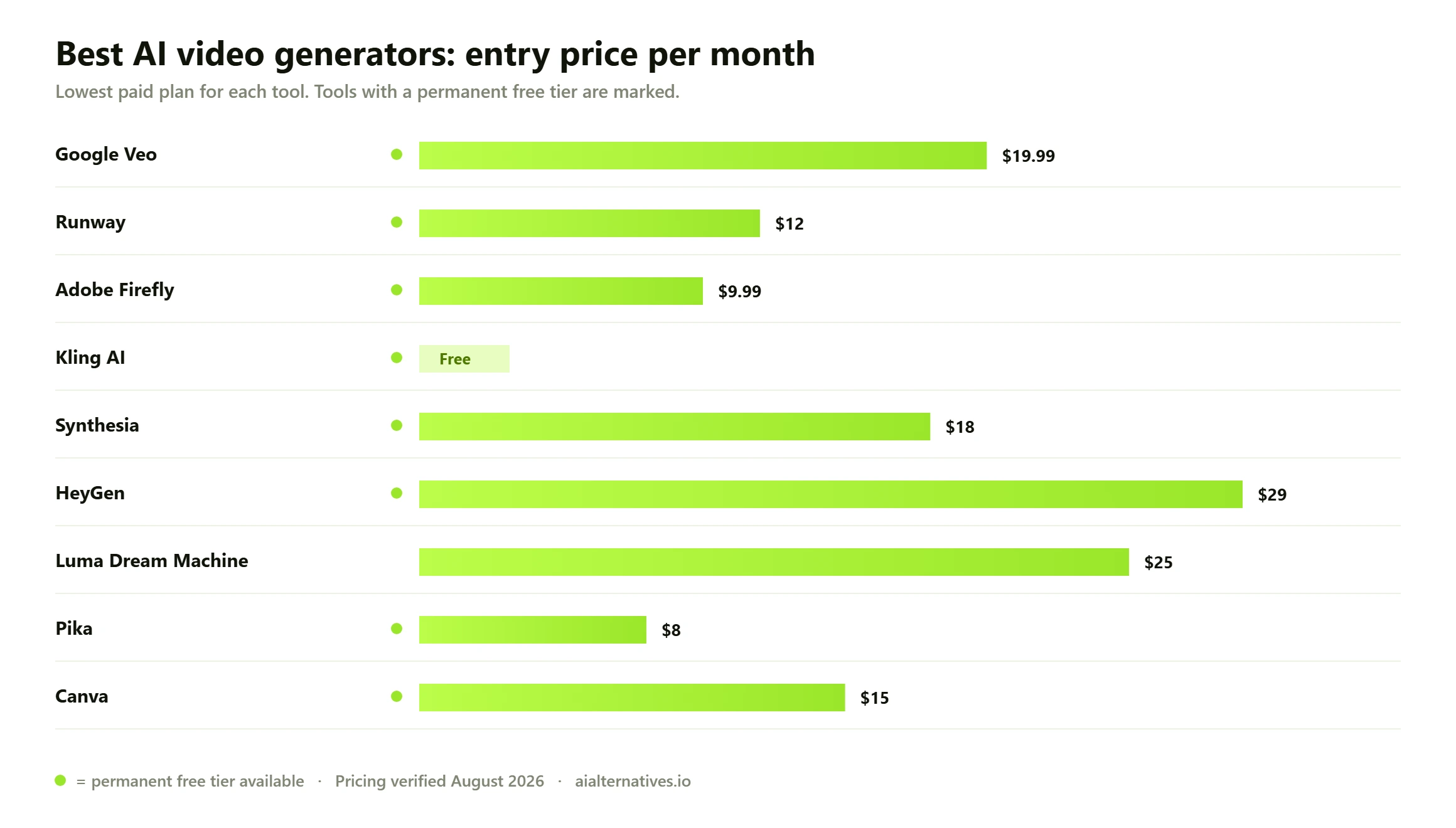
Entry pricing across the nine AI video generators in this guide. Bars show the cheapest paid tier that removes watermarks and permits commercial use, which is why free tiers do not appear as $0.
The number that actually matters: cost per usable second
Credit allowances are marketing. What you need is a rough sense of what one second of video you would actually publish costs you, and that depends almost entirely on your keep rate — the proportion of generations good enough to use.
Keep rates vary wildly by task. A simple image-to-video move on a clean product shot might land first time. A specific action, a named camera move, two characters interacting, legible on-screen text, or anything involving hands will often take four, six or a dozen attempts. Every one of those attempts costs full price.
What the credit maths really costs Work it out like this, with your own numbers. Take your plan’s monthly price and divide by the number of clips it buys, which gives cost per generation. Then divide by your keep rate. On a $12 plan buying, say, twenty-five five-second generations a month, raw output costs about $0.48 per clip, or roughly ten cents per raw second. At a one-in-four keep rate the honest figure is about $0.38 per finished second — nearly four times the headline. At one in ten it is closer to a dollar. The illustrative clip counts here depend on the model and resolution you choose, so run the sum against your own plan rather than trusting ours. The point is the multiplier, not the specific figure: budget three to five times your raw generation cost and you will rarely be surprised.
Three practical consequences follow. First, tools with cheap credits and mediocre output can beat expensive tools with excellent output, but only for throwaway social content where volume matters more than any individual clip. Second, for hero content the expensive model is usually cheaper, because a higher keep rate beats a lower unit price. Third, anything that raises your keep rate — a reference image, a first and last frame, an explicit camera instruction — is worth more than any discount.
When failed generations still cost you
There is a related trap that vendors rarely advertise: what happens when a generation errors out rather than merely disappointing you. The clearest public example is Adobe’s own community forum, where users have repeatedly reported credits vanishing on failed Firefly video generations, in some cases several hundred at a time.
Adobe’s stated position is that this should not happen. A community manager confirmed that credits are deducted when you press generate and are then restored automatically if generation fails, typically within about a minute. Multiple users in the same threads reported that restoration had not occurred days later. We report both halves of that honestly: the policy is that failures are refunded, and the lived experience is inconsistent enough that people keep filing threads about it.
What users consistently report Across vendor forums and community discussion the same four complaints recur regardless of platform. Credits disappear on errored generations and refunds are slow or invisible. Advertised clip lengths are maximums that specific models or tiers do not actually reach. Watermark removal sits one tier higher than people expect, so the first usable plan is rarely the cheapest one. And annual pricing is displayed as a monthly figure, so the number you compare is not the number you would pay month to month. Check your credit balance before and after a failed generation on any new platform — it takes thirty seconds and tells you more about a vendor than its marketing page.
Commercial use and training data: the part legal will ask about
If this video is going on a client’s channel or into a paid campaign, two questions matter more than output quality: are you permitted to use it commercially, and what was the model trained on.
Commercial rights
The general pattern is that free tiers do not grant clean commercial rights and almost always watermark output, while paid tiers do grant them. Luma states commercial use on every paid tier. HeyGen watermarks free output and caps it at one minute. Pika reserves watermark-free downloads for paid plans. Canva meters AI separately from its main subscription. None of this is hidden, but it is spread across four different documents per vendor, which is how people end up publishing watermarked video by accident.
Training data provenance
This is where the field genuinely divides. Adobe is the only major vendor here making provenance a product feature: Firefly is trained on licensed Adobe Stock and public-domain content rather than scraped video, outputs carry Content Credentials metadata, and enterprise agreements include IP indemnification. Most competitors are considerably less specific about their training corpora.
That vagueness is not academic. OpenAI’s Sora shutdown followed sustained friction with rightsholders over generated likenesses and copyrighted characters, and was widely reported as a turning point in how seriously studios treat generative video. If your work carries brand or legal risk, provenance is a feature worth paying for, and it is the single reason Firefly ranks as highly here as it does.
The Sora shutdown, and what it should teach you
OpenAI discontinued the Sora web and app experiences on 26 April 2026, with the API following on 24 September 2026. Users were directed to export their videos before the sunset, after which generated content is permanently deleted, and remaining Sora credits were made redeemable against Codex rather than refunded outright. You can read the terms in OpenAI’s own help documentation.
Two lessons. The first is practical: download your finished renders. Do not treat any generation platform as your archive, because your library exists at the pleasure of a company that may exit the category with a few months’ notice. Keep masters locally or in your own cloud storage the day you make them.
The second is strategic. This category is not stable. The best model changes every few months, vendors reprice without much warning, and even extremely well-funded products get cancelled. That argues strongly against annual commitments and in favour of tools you can leave in thirty days — which is worth weighing against the twenty to forty percent discounts that annual billing dangles.
Which tool for which job
What you are making
Pick
Why
Entry price
Cinematic shots with dialogue
Google Veo
Native audio generated with the picture
From $19.99 per mo
Directed shots in an edit
Runway
Motion brush, camera control, video-to-video
$12 per mo
Brand work needing legal sign-off
Adobe Firefly
Licensed training data, Content Credentials, indemnification
$9.99 per mo
Product stills brought to life
Kling AI
Strongest image-to-video coherence
Free daily credits
Training and onboarding video
Synthesia
160+ languages, SCORM export, brand controls
From $18 per mo
One campaign in many languages
HeyGen
Translation and lip-sync at scale, usable API
$29 per mo
Sweeping camera moves
Luma Dream Machine
Best parallax and depth handling
From $25 per mo
High-volume social clips
Pika
Cheapest credits, effects-led output
$8 per mo
Social assets end to end
Canva
Generation inside your templates and brand kit
$15 per mo
How to raise your keep rate
Since keep rate drives cost more than price does, the highest-return thing you can do is generate fewer, better attempts. What consistently works across every tool here:
Start from an image, not a sentence. Image-to-video removes most of the variance, because composition, lighting and subject are already fixed. Generate the frame in a stills model first, then animate it.
Describe the camera, not just the scene. Slow dolly in, static wide, handheld tracking. Models respond far better to explicit camera language than to adjectives about mood.
Keep clips short and cut. Coherence degrades with duration. Three separate three-second shots edited together will nearly always beat one ten-second generation, and cost less in rerolls.
Avoid hands, crowds and text. These remain the reliable failure modes in 2026. If you need on-screen text, add it in your editor afterwards rather than asking the model for it.
Fix one variable at a time. Changing the whole prompt after a near-miss throws away the part that worked. Adjust a single element and regenerate.
What none of these tools do yet
Set expectations honestly. Consistent characters across a long sequence still require workarounds rather than working natively. Precise lip-sync to a supplied audio track is the domain of avatar tools like Synthesia and HeyGen, not the cinematic generators. Long-form narrative remains an editing job, because everything here produces shots, not scenes. And nothing on this list replaces knowing what a good shot looks like — the tools have made generation cheap without making taste cheap.
FAQ
Questions people actually ask
What is the best AI video generator in 2026?
Google Veo 3.1 produces the most convincing output, largely because it generates native audio alongside the picture rather than requiring you to add sound later. If you need directable results inside an editing workflow rather than the single best-looking clip, Runway is the better working tool. If the video is for a client and legal has to approve it, Adobe Firefly is the safer answer.
What happened to Sora?
OpenAI discontinued the Sora web and app experiences on 26 April 2026, about six months after launch, with the API following on 24 September 2026. Users were told to export their videos before the sunset, after which content is permanently deleted, and remaining credits were made redeemable against Codex. Any guide still recommending Sora has not been updated.
What is the best free AI video generator?
Adobe Firefly and Kling both offer free allowances that refresh daily, which makes them genuinely usable rather than one-off demos. Watch the distinction carefully: Runway’s free tier is 125 credits once, not monthly, and HeyGen’s free videos are watermarked and capped at one minute. No free tier here gives you clean, unwatermarked commercial output.
How much does AI video actually cost per second?
Far more than the credit price suggests, because you pay for failed attempts too. Divide your plan cost by the clips it buys, then divide again by your keep rate. If one generation in four is usable, your true cost is four times the raw figure. Budget three to five times raw generation cost and you will rarely be caught out.
Can I use AI-generated video commercially?
On paid tiers, generally yes; on free tiers, generally no, and free output is usually watermarked. Luma grants commercial use on every paid tier. The harder question is not permission but liability — what the model was trained on, and who is responsible if a rightsholder objects. Adobe is currently the only major vendor here offering IP indemnification alongside disclosed, licensed training data.
Do I lose credits when a generation fails?
You should not, but it happens. Adobe’s stated policy is that credits are deducted when you press generate and restored automatically if generation fails, usually within a minute. Users in Adobe’s own community forums have repeatedly reported credits not coming back for days. Check your balance before and after a failure on any platform you are evaluating.
How long can AI-generated clips be?
Most cinematic generators work in short bursts, typically around five to ten seconds per generation, with extension features to chain them. Avatar tools are different: Synthesia and HeyGen handle much longer runtimes because they are animating a presenter to a script rather than inventing a scene. Treat advertised maximums as ceilings available on specific models and tiers, not defaults.
Which AI video generator is best for talking-head and training videos?
Synthesia for internal training, because of SCORM export for learning management systems, brand controls and 160-plus languages. HeyGen if the priority is taking one marketing video into many markets, since its translation and lip-sync are stronger. Neither is trying to make cinematic footage, and neither should be judged on that.
Is it cheaper to use one tool or several?
Several, usually, and that is the uncomfortable answer. The generators are good at different things, and the cost of a wrong choice is a stack of unusable clips. Many people run one cheap high-volume tool for social output and pay per project for a premium model on hero shots. Avoid annual commitments in a category this unstable.
Will AI video replace video editors?
Not on current evidence. These tools produce shots, not scenes. Someone still has to decide what the sequence is, cut it, grade it, mix the audio and judge whether it works. What has changed is that acquiring footage no longer requires a shoot, which shifts effort from production to editing rather than removing it.
Next step
Compare before you subscribe
Model quality and pricing in AI video shift every few months, and as the Sora shutdown showed, even the biggest products can disappear. Start from a tool you already know and see what else is out there before you commit to an annual plan.