01
Obsidian
Local-first notes you own
Stores plain Markdown files on your own disk, so it opens instantly for you and works offline by default. No account required to start.
Free tier: Full app free forever for personal use
New this week: 6 head-to-head tests added, including Claude vs Gemini for long documents.
See what changed →If you’re on Notion, you’ve likely felt this: they raised the Business price and killed the standalone AI add-on. Since 13 May 2025, full Notion AI only comes bundled with a $20 seat. If you were on Plus, you kept paying and lost the features.
Add slow page loads, offline support that arrived years late, and databases that fight back on you. No wonder you’re not the only one searching for Notion alternatives every single month.
Here are 8 tools worth your switching to, ranked. Every price below was checked on official pricing pages in August 2026.
Ranked by testing, current pricing and free-tier value. Details on every pick below the list.
Local-first notes you own
Free / Sync $4 per moEncrypted Notion-style workspace
Free / $9 per moSelf-hosting an open source clone
Free / $10 per user per moLocal-first notes you own
Stores plain Markdown files on your own disk, so it opens instantly for you and works offline by default. No account required to start.
Free tier: Full app free forever for personal use
Encrypted Notion-style workspace
Copies Notion’s objects-and-relations model but keeps everything you write end-to-end encrypted and local-first. Open source and self-hostable.
Free tier: Unlimited local objects, 1GB sync storage
Self-hosting an open source clone
The closest open source match to Notion’s docs, grids and boards, under the AGPLv3 licence. If you self-host, it’s free and well documented.
Free tier: 1 workspace, 2 members, 5GB storage
Notes without database sprawl
Replaces databases with typed objects: tag something a Book, Person or Meeting and the links build themselves for you. Far less setup than Notion.
Free tier: Unlimited objects, 5GB media, offline support
Real formulas and automations
Beats Notion on formulas, packs and automation depth. You only pay for people who build docs, not everyone who reads them.
Free tier: Unlimited personal docs; editors and viewers free
Docs plus real project management
Pick it when the wiki was never your point. You get sprints, dashboards, time tracking and docs in one dense package.
Free tier: Unlimited tasks and members, 60MB storage
Company wikis at scale
Built for org-wide documentation with permissions and approvals that actually hold up when you need them. Pairs tightly with Jira.
Free tier: Free for up to 10 users
Teams already on Microsoft 365
Notion-style pages and components that live inside Teams, Outlook and Word. No new licence needed if you already run Microsoft 365.
Free tier: Free tier with any Microsoft account
| # | Tool | Best for | Free tier | Price |
|---|---|---|---|---|
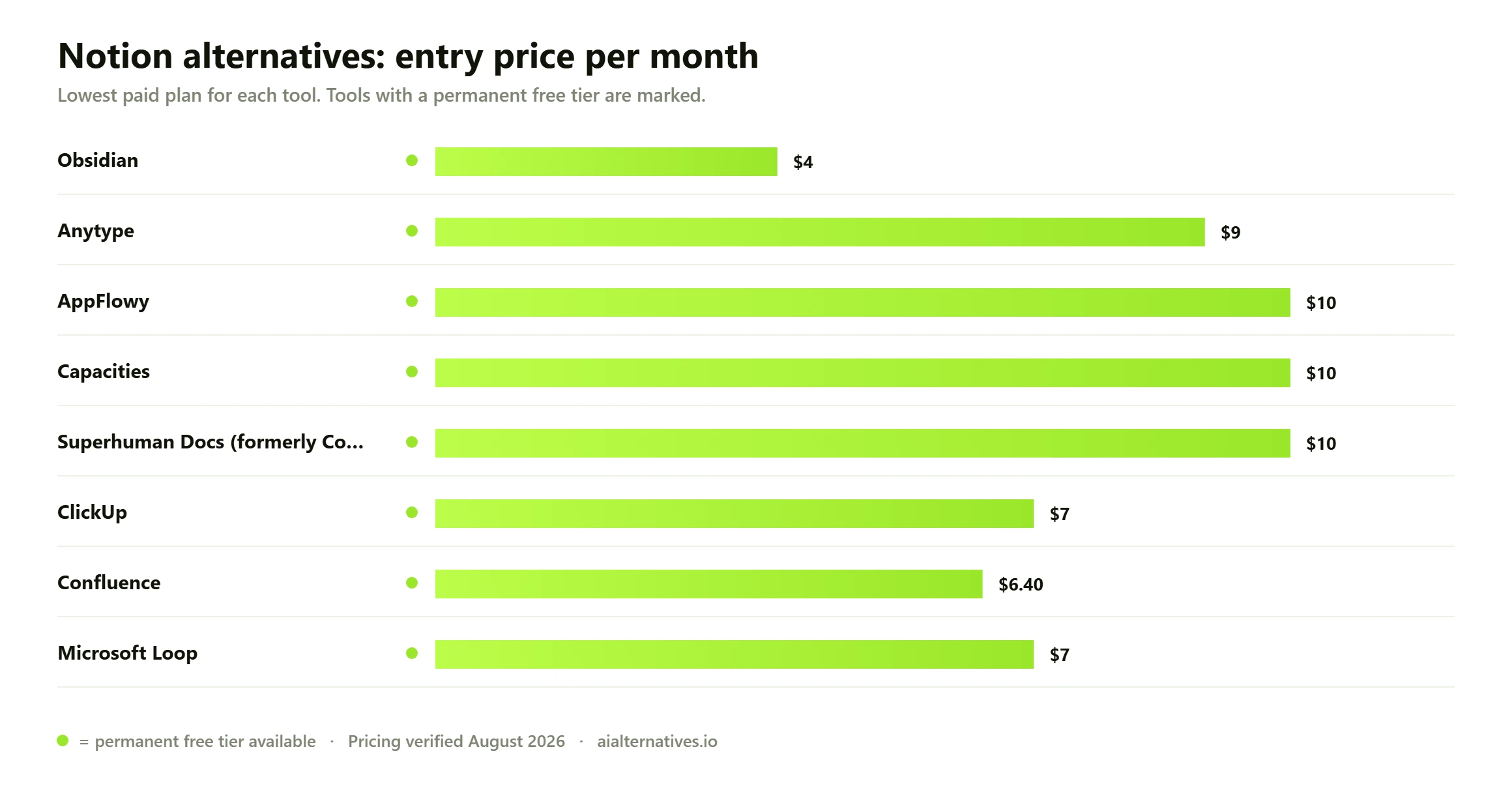
| 01 | Obsidian | Local-first notes you own | Free tier | Free / Sync $4 per mo |
| 02 | Anytype | Encrypted Notion-style workspace | Free tier | Free / $9 per mo |
| 03 | AppFlowy | Self-hosting an open source clone | Free tier | Free / $10 per user per mo |
| 04 | Capacities | Notes without database sprawl | Free tier | Free / from $10 per mo |
| 05 | Superhuman Docs (formerly Coda) | Real formulas and automations | Free tier | Free / from $10 per Doc Maker per mo |
| 06 | ClickUp | Docs plus real project management | Free tier | Free / $7 per user per mo |
| 07 | Confluence | Company wikis at scale | Free tier | Free / $6.40 per user per mo |
| 08 | Microsoft Loop | Teams already on Microsoft 365 | Free tier | Free / from $7 per user per mo |
On 13 May 2025, Notion retired the standalone AI add-on and folded full AI into the Business plan. If you’re on Business, your seat moved from $15 to $20 per month on annual billing. That’s a 33% increase.
The old add-on cost roughly $8 to $10 per member and worked on any plan. It’s gone for new customers. Notion’s own documentation now states that Notion AI is only available on Business and Enterprise plans. Free and Plus users get a small trial allowance, nothing more.
Usage-based billing followed. Custom agents started drawing metered Notion credits in May 2026, priced around $10 per 1,000 credits. If your team never wanted AI, you’re paying for it inside your seat anyway.
Performance is the oldest gripe you’ll hear. Large databases with rollups and linked views get sluggish on you, especially in the browser.
Offline editing only shipped on 20 August 2025. Even now, embeds, forms and buttons don’t work without a connection. CEO Ivan Zhao blamed the long delay on building conflict resolution for Notion’s database model.
Then there’s complexity. Relations, rollups and filtered views are powerful, and it’s very easy to over-build your own setup. Maybe you just want a fast place to write.
| Tool | Best for | Starting price | Free plan |
|---|---|---|---|
| Obsidian | Local-first notes you own | Free; Sync $4 per user per mo | Yes, full app free for personal use |
| Anytype | Encrypted Notion-style workspace | $9 per mo (or $99 per yr) | Yes, 1GB sync storage |
| AppFlowy | Self-hosting an open source clone | $10 per user per mo annually | Yes, 2 members and 5GB |
| Capacities | Notes without database sprawl | From about $10 per mo | Yes, unlimited objects |
| Superhuman Docs (Coda) | Real formulas and automations | From about $10 per Doc Maker per mo | Yes, unlimited personal docs |
| ClickUp | Docs plus project management | $7 per user per mo annually | Yes, unlimited tasks |
| Confluence | Company wikis at scale | $6.40 per user per mo | Yes, up to 10 users |
| Microsoft Loop | Microsoft 365 teams | From $7 per user per mo | Yes, with a Microsoft account |
Obsidian keeps every note as a plain Markdown file on your machine. Your pages open instantly, search is local, and nothing breaks when your wifi drops.
What it lacks: live multiplayer editing and Notion-style shared databases. Community plugins close most gaps, but you maintain them yourself.
Price: free for personal use. Sync is $4 per user per month billed annually ($5 monthly), Publish is $8 per site per month annually, and a commercial licence is $50 per user per year. Pick it if you write a lot, mostly solo, and want files that outlive the app.
Anytype is the closest thing to a private Notion you’ll find. Objects, relations and sets mirror Notion’s structure, but your data is end-to-end encrypted and stored locally first.
What it lacks: Notion’s enormous template ecosystem, and if you’re on the free tier, shared spaces cap at three members.
Price: free with 1GB of sync storage. Builder is $9 per month or $99 per year with 128GB. Co-Creator is $19 per month. Pick it if you want Notion’s model without Notion’s servers.
AppFlowy bills itself as the leading open source Notion alternative, and it largely delivers for you: docs, grids, kanban boards and AI, released under the AGPLv3 licence.
Self-hosting costs nothing beyond your own server. The managed cloud exists if you’d rather not run infrastructure.
Price: the free plan covers one workspace, two members and 5GB. Pro is $10 per user per month billed annually, $12.50 monthly. A local-AI Vault workspace add-on runs $6 per user per month, if you want it.
Capacities takes the opposite approach to databases. Instead of building tables, you tag a note as a type, and the connections assemble themselves.
What it lacks: deep project management and fine-grained team permissions. Think of this as a thinking tool for you, not an ops tool.
Price: the Basic plan is free with 5GB of media uploads and offline support. Pro starts around $10 per month, with roughly 16% off annual billing.
Coda became Superhuman Docs on 8 July 2026, after Grammarly’s parent company rebranded as Superhuman. If you had existing coda.io links, they redirect, and your plan carried over unchanged.
It beats Notion on formulas, buttons, automations and packs. The maker billing model is the real draw: you pay only for people who build docs, while editors and viewers are free.
Price: free plan with unlimited personal docs. Paid tiers start from about $10 per Doc Maker per month. Pick it if your Notion workspace is really a spreadsheet in disguise.
ClickUp is for you if your Notion workspace slowly turned into a project tracker. Tasks, sprints, dashboards, goals and time tracking are all native.
What it lacks: restraint. The interface is dense, and onboarding will take real effort from you.
Price: Free Forever includes unlimited tasks and members with 60MB storage. Unlimited is $7 per user per month annually, Business is $12. Notably, ClickUp Brain stays a separate $9 add-on rather than being forced into every seat.
If vendor lock-in is the actual problem for you, open source alternatives to Notion solve it permanently. Your data sits in your own database, on your own box.
The strongest picks:
One caution on Logseq. It’s still free, open source and privacy-first, but the long-running database rewrite was still shipping updates through mid-2026. Check the current release before you commit a knowledge base to it.
Budget honestly for self-hosting if that’s your route. The software is free; the server, backups and upgrades are not.
Wanting no AI is a legitimate requirement for you, not stubbornness. Client contracts, regulated industries and simple focus all argue for it.
Since May 2025 the math got worse: a Business seat bundles AI whether your team touches it or not. Notion AI alternatives that skip the whole category include Obsidian (nothing calls out unless you install a plugin), Logseq, Outline and Nuclino.
If you can’t leave, check whether your admin can disable Notion AI at the workspace level. You’ll still pay for the seat, but the suggestions stop interrupting.
Notion’s free plan is generous for one person and tight for teams. Once a workspace has two or more members, you hit a 1,000-block limit, 5MB file uploads, 7 days of page history and 10 guests.
Free alternatives to Notion that won’t degrade on you at that point:
Match the tool to your failure, not to the feature list.
Notion feels slow to you? Go local-first: Obsidian, Anytype or Capacities. Local storage removes the network from every keystroke.
You need offline that always works? Obsidian and Anytype are offline by design. Notion’s offline mode still drops embeds, forms and buttons.
Privacy or compliance driving your decision? Self-host AppFlowy, Outline or Docmost, or use Anytype’s encryption.
Databases were the whole point for you? Superhuman Docs handles formulas and automation better than Notion ever did.
It became a project tracker? ClickUp. It became a company wiki? Confluence. You already pay Microsoft? Loop is included.
If you’re a solo user, usually yes. Obsidian or Anytype will feel faster to you within a week, and you stop paying for AI you didn’t ask for.
If you’re moving a team, be careful. Migration cost is real: relations, rollups, permissions and shared templates rarely export cleanly, and Markdown exports flatten your databases.
Stay on Notion if your workspace runs on complex linked databases, your team already knows it, and you’re on the $10 Plus tier. Plus is still competitively priced, and you’re not forced onto the $20 AI seat.
Leave if you’re being pushed to Business purely for AI, if performance blocks daily work, or if your data can’t sit on someone else’s servers. Run one project in the new tool for two weeks before you move everything.
The questions people actually ask on Google, Reddit and Quora — answered with what we verified this month.
How we testYes, several. Obsidian is free forever for personal use with no block or page limits, and AppFlowy is free to self-host under the AGPLv3 licence. Anytype’s free tier gives you unlimited local objects and 1GB of sync. For teams, Confluence is free up to 10 users and ClickUp’s Free Forever plan allows unlimited tasks and members.
Notion discontinued the standalone AI add-on on 13 May 2025 and bundled full AI into the Business plan. If you’re on Business, your seat went from $15 to $20 per month on annual billing, a 33% increase. Existing customers moved to the new rate at their first renewal on or after 13 August 2025. If you stayed on Plus, you kept the $10 price but lost access to full AI.
AppFlowy is the closest match, with docs, grids and kanban boards under an AGPLv3 licence and a documented self-hosting guide. Anytype is the better choice if you want Notion’s object-and-relation model plus end-to-end encryption. For pure team documentation, Outline and Docmost are lighter and easier for you to run.
Yes, since 20 August 2025. You can view, edit and create pages without a connection on desktop and mobile, and changes sync when you reconnect. Embeds, forms and buttons still don’t work offline. Obsidian and Anytype remain more dependable because they’re local-first by design rather than retrofitted.
Obsidian, Logseq, Outline and Nuclino ship no built-in AI you have to opt out of. This matters because Notion’s $20 Business seat now includes AI whether your team uses it or not. If you’re staying on Notion, a workspace admin can usually disable AI features for you, though the seat price doesn’t change.
Coda was renamed Superhuman Docs on 8 July 2026, after Grammarly’s parent company rebranded as Superhuman. If you had existing docs, formulas, automations and plans, they carried over unchanged, and your old coda.io links redirect automatically to docs.superhuman.com. The Doc Maker billing model stayed, so your editors and viewers are still free.
See how the top picks square off head to head, or browse every alternative guide we publish.