The Best AI Website Builder in 2026: 9 Tools Ranked on Price, Output and What You Actually Own
Every AI website builder demo looks the same. You type a sentence, a site appears, everyone claps. The interesting question is not whether the tool can generate a homepage in ninety seconds, because in 2026 they all can. The interesting question is what you are left holding twelve months later, when you want to change hosts, hand the project to a developer, or simply stop paying.
That is the gap in almost every roundup you will read. We checked the major comparison pieces ranking for this term and none of them answer the two questions that decide whether a build was a good idea: can you take the site with you, and what does it really cost once a domain, mailboxes and payment processing are added to the sticker price? A builder that is $10 cheaper per month can quietly be $400 more expensive per year once transaction fees land.
So this guide ranks nine AI website builders on generation quality and ease of use, then adds the two layers competitors skip: portability and true total cost. Prices below were read off each vendor’s own pricing page in late August 2026. Where a vendor does not publish a figure openly, we say so rather than guessing.
Ranked best-first for a general audience. Prices are the vendor’s own published figures as of 25 August 2026. Read the portability table further down before you commit to any of them.
Best overall
Wix
Best for most people
Free / $19.77 per mo
Runner-up
Framer
Best for design control
Free / $10 per mo
Third pick
Lovable
Best for app-like sites
Free / from $25 per mo
01
Wix
Best for most people
Wix pairs a genuinely capable AI setup flow with the deepest feature set here: bookings, stores, memberships, email marketing and a real app market. The AI gets you a structured, on-brand draft in minutes, and the drag-and-drop editor lets you fix anything it got wrong without touching code. The trade-off is portability, because a Wix site cannot be exported and rebuilt elsewhere.
Free tier: Free plan with Wix branding and a wix.com subdomain; no custom domain
Free / $19.77 per mo
02
Framer
Best for design control
Framer is the pick when the site has to look designed rather than assembled. It generates layouts you can then manipulate with real typographic and layout control, and its CMS handles blogs and case studies without a plugin. Publishing is fast and hosting is included, though you are still publishing into Framer rather than to a server you control.
Free tier: Free tier with a Framer subdomain, 1 GB bandwidth and 500 starter AI credits
Free / $10 per mo
03
Lovable
Best for app-like sites
Lovable writes an actual React and Tailwind codebase from a chat prompt, so you get logins, dashboards and database-backed features that template builders cannot produce. Its biggest practical advantage is the exit door: you can sync the project to GitHub and take the source with you. Credits are consumed per prompt, so vague instructions get expensive fast.
Free tier: Free tier with a daily credit allowance and public projects
Free / from $25 per mo
04
Hostinger Website Builder
Best on a tight budget
Hostinger bundles the things other builders charge separately for: hosting, a free domain for the first year, mailboxes and zero platform transaction fees on stores. The AI generation is competent rather than remarkable, but the total first-year cost is the lowest of any tool here by a wide margin. Watch the renewal price, which is roughly three to four times the intro rate.
Free tier: No permanent free plan; 30-day money-back guarantee instead
From $2.99 per mo intro, $10.99 renewal
05
v0 by Vercel
Best for developers
v0 turns prompts into production-grade React components you can copy straight into an existing codebase, which makes it less a website builder than an extremely fast front-end pair. It syncs with GitHub even on the free tier, so nothing you generate is trapped. You will need to handle your own hosting decisions, and deployment nudges you toward Vercel.
Free tier: Free tier with roughly $5 of monthly credits and 7 messages per day
Free / $30 per user per mo
06
10Web
Best for WordPress sites
10Web generates a real WordPress site on managed Google Cloud hosting, which means the output is a standard WordPress install rather than a proprietary format. That single fact makes it the most portable mainstream option: if you leave, a normal WordPress migration moves your content. AI credits are metered monthly and the cheapest plan covers one site.
Free tier: No permanent free plan; free trial only
From $10 per mo
07
Squarespace
Best for portfolios and content
Squarespace still produces the most consistently tasteful output without much intervention, and its Blueprint AI flow narrows the design choices instead of overwhelming you. Editorial and portfolio sites look expensive here with very little effort. The catch is commerce economics: lower tiers levy a platform transaction fee on top of card processing.
Free tier: No free plan; 14-day free trial
Trial only, then paid plans
08
Durable
Fastest for service businesses
Durable is built for plumbers, cleaners, coaches and consultants who need a credible one-page presence plus lead capture, invoicing and a light CRM. It generates a usable site in well under a minute and the surrounding business tooling is the real product. Customisation is deliberately shallow, and there is no meaningful code export.
Free tier: Free plan with a Durable subdomain, 5 images and 10 AI chat messages per month
Free / $25 per mo
09
Relume
Best for agency workflows
Relume works upstream of the visual build: describe the business and it produces a sitemap, then wireframes, then component-level structure you push into Webflow or Figma. For agencies this removes the slowest part of a project, which is deciding what pages should exist at all. It is a planning accelerator, not a hosting platform, so you still need somewhere to publish.
Free tier: Free tier with limited sitemap and wireframe generations
Free / from $26 per mo
Best AI website builders compared at a glance9 tools
#
Tool
Best for
Free tier
Price
01
Wix
Best for most people
Free tier
Free / $19.77 per mo
02
Framer
Best for design control
Free tier
Free / $10 per mo
03
Lovable
Best for app-like sites
Free tier
Free / from $25 per mo
04
Hostinger Website Builder
Best on a tight budget
Trial only
From $2.99 per mo intro, $10.99 renewal
05
v0 by Vercel
Best for developers
Free tier
Free / $30 per user per mo
06
10Web
Best for WordPress sites
Trial only
From $10 per mo
07
Squarespace
Best for portfolios and content
Trial only
Trial only, then paid plans
08
Durable
Fastest for service businesses
Free tier
Free / $25 per mo
09
Relume
Best for agency workflows
Free tier
Free / from $26 per mo
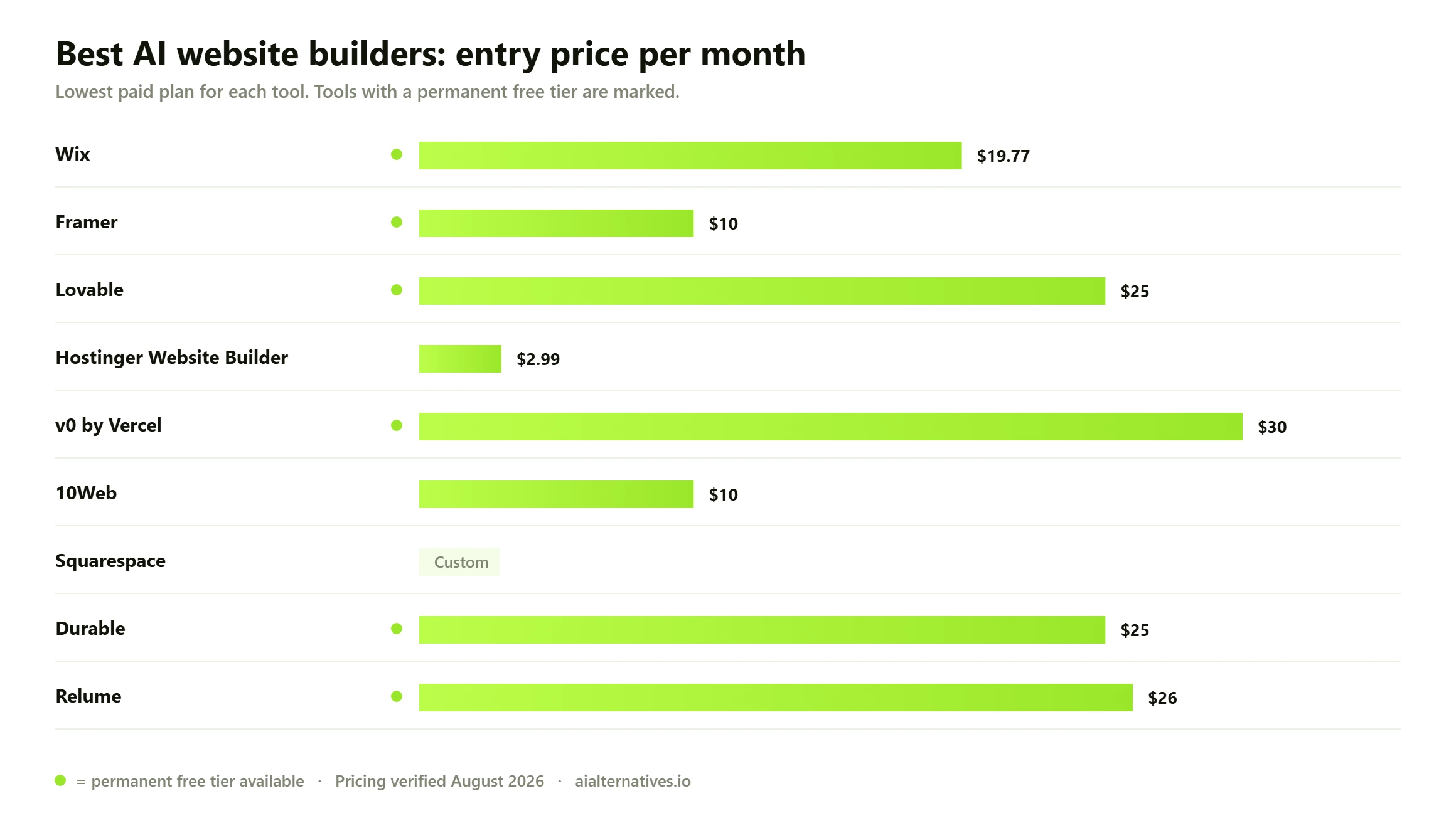
Entry pricing across the nine AI website builders in this guide. Bars show the cheapest route to a site on your own domain without vendor branding, which is why free tiers do not appear as $0.
How we chose, and how to read this list
There is a lot of confident nonsense written about AI website builders, much of it by people paid per affiliate click. So it is worth being plain about what this guide is and is not.
How we verified this Every price, free-tier limit and transaction fee on this page was read directly from the vendor’s own pricing or support documentation between 22 and 25 August 2026. Wix Payments rates come from Wix’s published service-fee article, not from a third-party summary. Where a vendor does not publish a number openly — Kling-style hidden pricing walls, or plans only visible after signup — we flag it rather than inventing a figure. This is a research and documentation review, not a hands-on bake-off: we have not built nine production sites and we are not going to pretend otherwise. What we can do is read the terms carefully, which is the part most roundups skip.
Rankings weight four things: the quality of the first draft the AI produces, how far you can push it afterwards without hitting a wall, what the platform costs across a realistic first year, and whether you can leave. That last criterion moves several tools up and down relative to where you will see them elsewhere.
What you actually own: portability and lock-in
This is the section other guides do not write, and it is the one that will matter most to you in 2027. AI website builders fall into three distinct groups, and the group a tool belongs to matters more than any feature comparison.
Group one: closed platforms
Wix, Squarespace and Durable generate sites in proprietary formats. There is no meaningful export. If you leave, you leave with your text, your images and your domain, and nothing else. You rebuild from scratch. This is not a scandal — it is the deal you make in exchange for the platform handling hosting, security patching, uptime and compliance so you never think about them. But it should be a conscious choice, not a surprise.
Group two: standards-based platforms
10Web is the outlier among mainstream builders because what it generates is a genuine WordPress installation. WordPress powers a substantial share of all websites tracked by W3Techs, and a standard WordPress site can be migrated to any of thousands of hosts using ordinary tooling. You are locked into 10Web’s hosting convenience, not into its file format. If you want AI speed without a one-way door, this is the shortest path.
Group three: code generators
Lovable and v0 hand you source code. Lovable syncs to GitHub; v0 syncs to GitHub even on its free tier. The site is a React application you own outright and can host anywhere, and a developer can pick it up without archaeology. The cost of that freedom is responsibility: nobody patches your dependencies, nobody guarantees uptime, and nobody stops you shipping an insecure database rule. Several of the loudest cautionary tales in vibe-coding communities are about exactly that.
What to check before you commit Ask four questions of any builder before you pay. One: if I cancel, what file do I walk away with — a database export, a code repository, or a PDF of my own text? Two: is my domain registered to me, or to the platform on my behalf? Free-domain-for-a-year offers are frequently registered in a way that makes transfer awkward at renewal. Three: what happens to my site the day my card fails — does it go offline, or does it revert to a branded subdomain? Four: is my content stored in a way I can bulk-export, or would I be copying pages by hand? If a vendor cannot answer question one in a single sentence, treat that as the answer.
The true cost, once you add everything up
Sticker prices are close enough across these tools that they are almost irrelevant. The differences appear in the three costs nobody puts on the pricing page: your domain, your email, and the cut taken from every sale you make.
Payment processing is the big one. Wix publishes its US card rate as 2.9% plus $0.30 per transaction, rising to 3.7% plus $0.30 for American Express and 6% plus $0.30 for buy-now-pay-later options like Klarna and Affirm. Squarespace’s lower tiers add a platform transaction fee of up to 2% on physical goods and up to 7% on digital content and memberships, on top of processing. Hostinger charges no platform fee at all. On $50,000 of annual sales, that spread between a 2% platform cut and no platform cut is $1,000 a year — enough to make the cheapest monthly plan the most expensive choice overall.
Builder
Export path
Free tier
Domain year one
Platform transaction fee
Wix
None; rebuild required
Yes, branded subdomain
Free with yearly plan
0% platform, 2.9% + $0.30 processing
Framer
None; hosted only
Yes, 1 GB bandwidth
Free .com on yearly Basic or Pro
Handled by third-party checkout
Lovable
Full source via GitHub
Yes, daily credits
Bring your own
None; you choose the processor
Hostinger
Standard site files
No, money-back guarantee
Included free for 1 year
0% platform fee
v0 by Vercel
Full source via GitHub
Yes, 7 messages per day
Bring your own
None; you choose the processor
10Web
Standard WordPress migration
No, trial only
Included, up to $30 value
Depends on your plugin
Squarespace
None; rebuild required
No, 14-day trial
Free with annual plan
Up to 2% goods, up to 7% digital
Durable
None; rebuild required
Yes, branded subdomain
Included on Launch
Depends on integration
Relume
Wireframes to Webflow or Figma
Yes, limited generations
Not applicable
Not applicable
Matching the tool to what you are actually building
A brochure site for a local service business
Durable or Hostinger. You need a phone number, a service list, some proof you are real, and a contact form. Durable adds invoicing and a light CRM, which for a one-person trade business is genuinely more useful than design flexibility. Do not over-engineer this.
A portfolio or editorial site
Squarespace or Framer. Both produce work that looks considered rather than generated. Framer gives you more control and a better free tier; Squarespace gives you less rope to hang yourself with. If your work is the product, pay for the one whose output you find beautiful.
An online store
Hostinger if margin matters and volume is modest, Wix if you want the deepest built-in commerce features and can absorb the processing rates. If you expect meaningful volume, run the transaction-fee maths before the subscription maths — and compare against dedicated commerce platforms in our Shopify alternatives guide, because a general website builder is rarely the cheapest place to process $200,000 of sales.
Something with logins, dashboards or a database
Lovable or v0. Template builders cannot do this and will waste a fortnight of your life proving it. Accept that you are now maintaining software, and budget accordingly.
A site a developer will inherit
10Web, Lovable or v0 — anything from groups two and three above. Handing a developer a closed platform site means handing them a rebuild quote.
Where the AI still falls down
Across community discussion and vendor documentation, the same three limits show up regardless of which tool you pick.
Copy is generic by default. Every builder produces plausible, forgettable marketing prose. It reads like a website and says nothing. Rewriting the words is the single highest-value hour you will spend, and no tool here removes that job.
Images are the weak link. Generated or stock imagery is the fastest giveaway that a site was assembled rather than made. Real photographs of a real business outperform anything the AI supplies.
Second and third pages degrade. The homepage is where the models are strongest, because that is what they have seen most of. Interior pages, pricing tables and long-form content need substantially more manual work than the demos imply.
Credits run out faster than expected. On credit-metered builders, vague prompts burn allowance quickly because each imprecise instruction triggers a full regeneration. Lovable’s own documentation prices individual prompts at roughly half a credit to nearly two credits depending on complexity.
A realistic first-year budget
For a small business site on your own domain with working email, expect to spend between $150 and $400 in year one across every option here, and rather more in year two once introductory rates expire. Hostinger sits at the bottom of that range, Wix and Squarespace near the top, and the code generators land wherever your hosting and processing choices put them.
The one number to watch is renewal. Hostinger’s headline $2.99 becomes $10.99, roughly a fourfold increase, and it is charged against a multi-year commitment. That is not deceptive — it is disclosed on the pricing page — but it does mean the cheapest option in year one is not automatically the cheapest across three.
FAQ
Questions people actually ask
What is the best AI website builder overall in 2026?
For most people, Wix. It has the strongest combination of AI setup quality, editing flexibility and built-in features like bookings and stores, and its free tier lets you see the output before paying. If you care more about owning what you build, 10Web or Lovable are better answers, because Wix sites cannot be exported.
Can you really build a whole website with AI?
You can build a genuinely publishable site, yes. What AI will not do is decide what your business should say, supply real photographs of your work, or write copy that sounds like a person. Treat the generated site as a very good first draft that saves you the structural work, then spend your time on the words and images.
What is the best free AI website builder?
Framer has the most generous genuinely free tier — a real subdomain, 1 GB of bandwidth and 500 starter AI credits. Wix and Durable also have permanent free plans with platform branding. Note that no free plan includes a custom domain, so a free site always carries someone else’s name in the URL.
Can I export my site if I want to leave?
It depends entirely on which of three groups the builder belongs to. Wix, Squarespace and Durable offer no meaningful export and you would rebuild from scratch. 10Web produces a standard WordPress site you can migrate normally. Lovable and v0 give you actual source code via GitHub. Decide this before you build, not after.
Is an AI website builder good for SEO?
The builder matters far less than what you do with it. All the mainstream options here produce reasonable HTML, handle meta tags and generate sitemaps. What sinks AI-built sites in search is the thin, generic copy they ship with, plus interior pages that were never properly written. Fix the content and the platform rarely holds you back.
Do I own the code an AI website builder generates?
On code generators like Lovable and v0, yes — you get the repository and can host it anywhere. On closed platforms you own your content and your domain, but the site itself is a configuration inside their system rather than files you possess. Always check the terms for the specific plan you are on, since export rights sometimes sit behind higher tiers.
How much does an AI website builder actually cost per year?
Budget $150 to $400 for year one on a custom domain with email, depending on the platform. The subscription is usually the smallest part once you add a domain, mailboxes and payment processing. If you sell anything, the transaction fee will likely outweigh the monthly fee — Squarespace’s lower tiers take up to 2% on goods and up to 7% on digital products before card processing is applied.
Wix or Lovable — which should I pick?
Different tools for different jobs. Wix if you want a marketing site with bookings or a shop and you never want to think about hosting. Lovable if the thing you are building has user accounts, a database or app-like behaviour, and you want the source code. Lovable will frustrate you as a brochure-site tool; Wix simply cannot build a dashboard.
Is Hostinger really that cheap, or is there a catch?
The catch is disclosed but easy to miss. The $2.99 rate is an introductory price tied to a long commitment, and it renews at $10.99. The genuine advantage that survives renewal is the 0% platform transaction fee on ecommerce, which on any real sales volume is worth far more than the monthly difference.
Should I use an AI website builder or hire a designer?
If the site is a cost centre — a place customers verify you exist and get in touch — use a builder and spend the saved money on the actual business. If the site is the business, or if it needs to do something unusual, a designer working in Framer or Webflow will produce something an AI cannot. Relume is a useful middle ground, because it lets a designer skip the slow structural phase.
Next step
Keep comparing before you commit
Pricing and export terms on these platforms change more often than the marketing suggests. If one of the builders above is close but not quite right, the fastest way to find the alternative is to start from the tool you already know.